วันเสาร์ที่ 6 สิงหาคม พ.ศ. 2559

happy phone truesmart 3.5 connect internet usb on windows 10

1.เนื่องจาก windows 10 ไม่ยอมให้ลง driver ที่ไม่มี ลายเซ็น จึงต้อง ทำการ
disable driver signature enforcement เพื่อ ทำการ ปิดลายเซ็น ไดร์ฟเวอร์

a.  กดปุ่ม  Win + C แล้วกด  PC settings.
b. หาหัวข้อ  “Update & recovery”
c. จากนั้น คลิ๊ก Recovery option ด้านซ้ายมือ
d.  เมื่อเลือกแล้ว จะห็น หัวข้อ  advanced startup section ด้านขวา , กดปุ่ม  “Restart now”
e. หลังจากเครื่อง รีสตารท์ จะเห็น ตัวเลือก   Troubleshoot option.
f. เข้าไปส่วน  Advanced options.
g. จากนั้นเข้า  Startup Settings.
h. เมื้อแก้ไขค่าเสร็จ จากนั้น รีสตารท์ ครั้งสุดท้าย

I. จะปรากฏ รายการ ต่าง startup settings  (การตั้งค่าการเริ่มวินโดว) มองหาหัวข้อ  “Disable driver signature enforcement”. ซึ่งต้องกด คีย์  F7


2. ลงไดรเวอร์ ให้ตรง กับ วินโดว์ 32bit หรือ 64bit ก็จะลงผ่าน
 ดาวน์โหลด ไดรฟเวอร์็ที่นี่
ถ้าลงผ่านจะเป็น ดังภาพด้านล่าง


3.ต่อเชื่อมโทรศัพท์ กับ เครื่องคอม ผ่านสาย usb
4.การตั้งค่าการเชื่อมต่อ ทำครั้งแรก
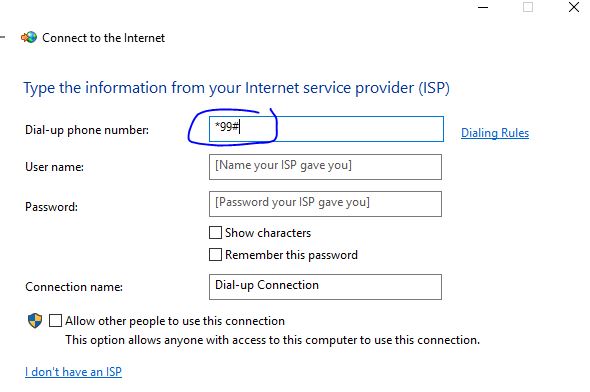
 เข้า setting -> network -> dialup -> set up new


  4.1


4.2


4.3


test happy phone button style 2.8inch 2016 unlocking

software require  ซอฟแวร์ที่ต้องมี
1.researchdownload
2.driver usb (spd cpu)
3.rom unlock .pac

before unlock


1.install driver usb ( cpu spectrum )
ลงไดรฟเวอร์ให้ถูกต้องก่อน


2. first instruction  before flashing firmware
  check your driver ready

pickup mobile -> pull battery out -> connect usb from mobile to computer -> press and hold # key ->  insert battery

wait until your computer install driver and device manager show image like below.

เริ่มขั้นตอนการเตรียมความพร้อม การแฟลช เฟริมแวร์

 ลองทดสอบเข้าโหมดพิเศษ สำหรับ แฟลช เฟริมแวร์
 โทรศัพท์ ->ถอดถ่าน -> เสียบสาย -> กดปุ่ม #ค้าง ->ใส่แบต

ถ้าสำเร็จ เครื่องคอมจะถามไดรฟเวอร์ก็ ปล่อยให้มันลงอัตโนมัติ

และ device manager จะขึ้น ดังรูป


3.open research download program
pick up -> unlocked .pac firmware -> press play (ready download) -> do second instruction again (number 2)-> wait for firmware downloading

เปิดโปรแกรม research download -> เปิดโปรแกรม .pac ที่อันล็อค -> ทำขั้นตอนที่ 2 อีกครั้ง -> โปรแกรมจะ โหลดเฟริมแวร์ให้ รอ


แหล่งโหลด
[GUIDE] Use Research Download (Spredtrum ROM Flash)
http://forum.xda-developers.com/showthread.php?t=2624918

driver
https://drive.google.com/file/d/0BztcLUCoKzp3LS1SblRZdVVQZzA/view

firmware
http://www.thailand-developers.com/thread-3343-1-1.html


วันศุกร์ที่ 29 กรกฎาคม พ.ศ. 2559

how to connect internet by nokia or other phone via bluetooth windows 8 , 10

การเชื่อมต่อ โทรศัพท์ ผ่าน บลูทุธ บน วินโดว์ 8 10
how to connect internet by nokia or other phone via bluetooth windows 8 , 10

1.ทำการ pair โทรศัพท์ ให้เรียบร้อย  ตามรูป กด ปุ่ม pair
   Go to setting -> Device ->manage bluetooth (in windows 10 )
 Be sure!  make your mobile discovery
 if found then press pair

1.1 wait for pass code pair your phone


2. ตรวจสอบโทรศัพท์ ว่า รองรับ การเชื่อมต่ออินเทอร์เนต ผ่าน บลูทุธ หรือไม่
check capability of mobile phone support internet via bluetooth

2.1 กด open settings

2.2 ตรวจสอบ มีคำเหล่านี้ ไหม ที่ com port ( there are com ports show similar image above)

วันพฤหัสบดีที่ 14 กรกฎาคม พ.ศ. 2559

ลองเริ่มต้น php กับ google drive กูเกิลไดรพ

1.ต้องมี กูเกิล จีเมล์ สมัครให้เรียบร้อย
2.เข้ากูเกิล คอนโซล
https://console.developers.google.com/

3.กรณี ไม่มี โปรเจค ต้องสร้างก่อน
4.enable api ที่ต้องการ กรณีนี้เรา จะทดสอบ ไดรฟ

วันอังคารที่ 5 กรกฎาคม พ.ศ. 2559

เซ็นเอกสารผ่านมือถือ โดย ใช้ adobe reader

1.โหลด adobe reader จาก playstore
  load and install  adobe reader from playstore


2.เปิดไฟล์ pdf ที่ต้องการ open pdf document that want to sign
3. มองที่มุมขวาล่าง เห็น รูปไอคอนปากกา กด ปุ่ม เซ็นเอกสาร
see right below pen icon  , then tap it


4. เซ็นเอกสาร sign whatever you want and tap done icon


วันพฤหัสบดีที่ 24 มีนาคม พ.ศ. 2559

How to add google play store in samsung a9 (from china)

by the technic , chinese rom of SM-A9000 ( galaxy a9) does not come with play store ,but hongkong (firmware) rom ,there are stores app.

1.download [TOOL] SamFirm - Samsung firmware downloader & checker

from http://forum.xda-developers.com/galaxy-tab-s/general/tool-samfirm-samsung-firmware-t2988647

 1.1 extract it

 1.2.got pda and csc information from this
2. run "SamFirm.exe" put information below
Device model: SM-A9000
Region: TGY
PDA: A9000ZHU1APB4
CSC: A9000ZZH1APB4
Phone: A9000ZCU1APB4
Binary Nature: Checked
Check CRC32: Checked
Decrypt automatically: Checked

push download button and wait for file download


3.extract .zip file then there are 4 files .

      3.1 7zip inside file file"CSC_*** .tar.md5" to get .pit file


      3.2.got it
 4.download odin3.xx   and run it
5. put samsung mobile to download mode  and connect computer
 (press vol-down + home + power ) together after power up.


6.run odin put file all picture below , then press start .wait for success.